


AI Summarize


Share


Whether you're a software developer, a service provider or an ecommerce company, practically every business requires a set of legal agreements between itself and its users.
Two common and beneficial agreements are the End User License Agreement (EULA) and the Terms and Conditions agreement (T&C).
Confused about which one you need? Want to know how to create a valid EULA or a Terms and Conditions agreement?
In this article, we're going to explain the main features of both types of agreements, when you should use each one, what each agreement should contain, and how to best display and get consent to your agreements.
- 1. Differences Between EULA and Terms and Conditions
- 1.1. What's an EULA?
- 1.2. What are Terms and Conditions?
- 1.3. Should I Create an EULA or Terms and Conditions Agreement?
- 2. EULA vs Terms and Conditions for Mobile Apps
- 2.1. Do I Need Both Terms and Conditions and an EULA for my Mobile App?
- 2.2. Apple App Store vs. Google Play
- 2.3. How to Display these Agreements in Your Mobile App
- 3. EULA: Frequently Asked Questions
- 3.1. Is an EULA a Legal Requirement?
- 3.2. What are the Benefits of Creating an EULA?
- 3.3. Is an EULA a Contract?
- 4. Terms and Conditions: Frequently Asked Questions
- 4.1. Are Terms and Conditions a Legal Requirement?
- 4.2. What are the Benefits of Creating Terms and Conditions?
- 4.3. Is a Terms and Conditions Agreement a Contract?
- 5. Clauses Appearing in Both Types of Agreement
- 5.1. Other Agreements
- 5.2. Disclaimer of Warranties
- 5.3. Limitation of Liability
- 5.4. Governing Law
- 6. EULA Clauses
- 6.1. Granting of License
- 6.2. Description of Other Rights and Limitations
- 6.3. Termination of License
- 7. Terms and Conditions Clauses
- 7.1. Acceptance of Terms
- 7.2. Payments and Billing
- 7.3. Account Suspension/Termination
- 8. Ensuring Your EULA or Terms and Conditions Agreement is Enforceable
- 8.1. Getting Consent for EULA Agreements
- 8.2. Getting Consent for Terms and Conditions Agreements
- 9. Summary
Differences Between EULA and Terms and Conditions
What's an EULA?
An End User License Agreement (EULA) (sometimes known as a "software license") is an agreement between the developer or publisher of a software product and the user of that software. It gives the purchaser the right to use that copy of your software after they have paid for it.
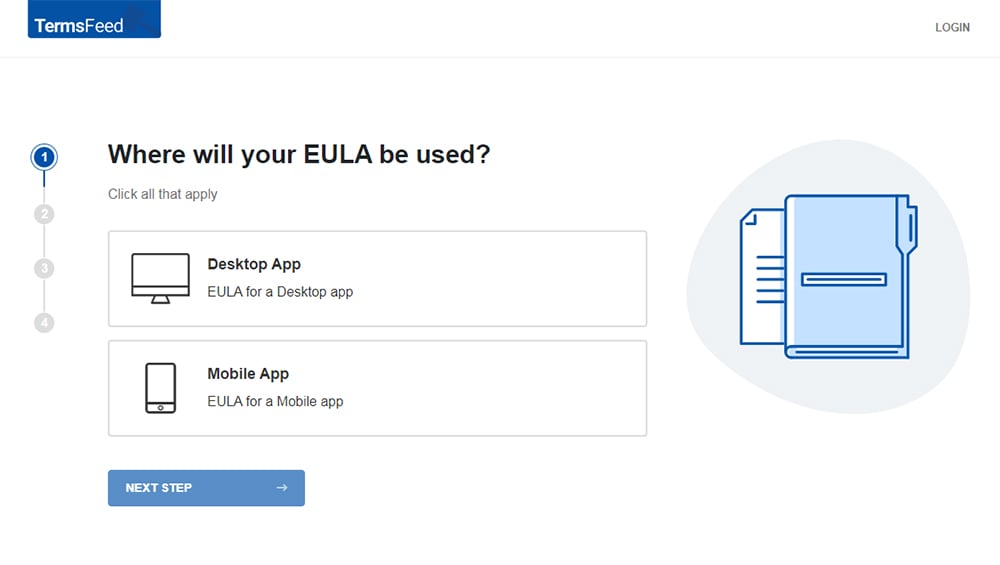
Our EULA Generator makes it easy to create an EULA. Just follow these steps:
-
At Step 1, select the Desktop app option and click "Next step":
-
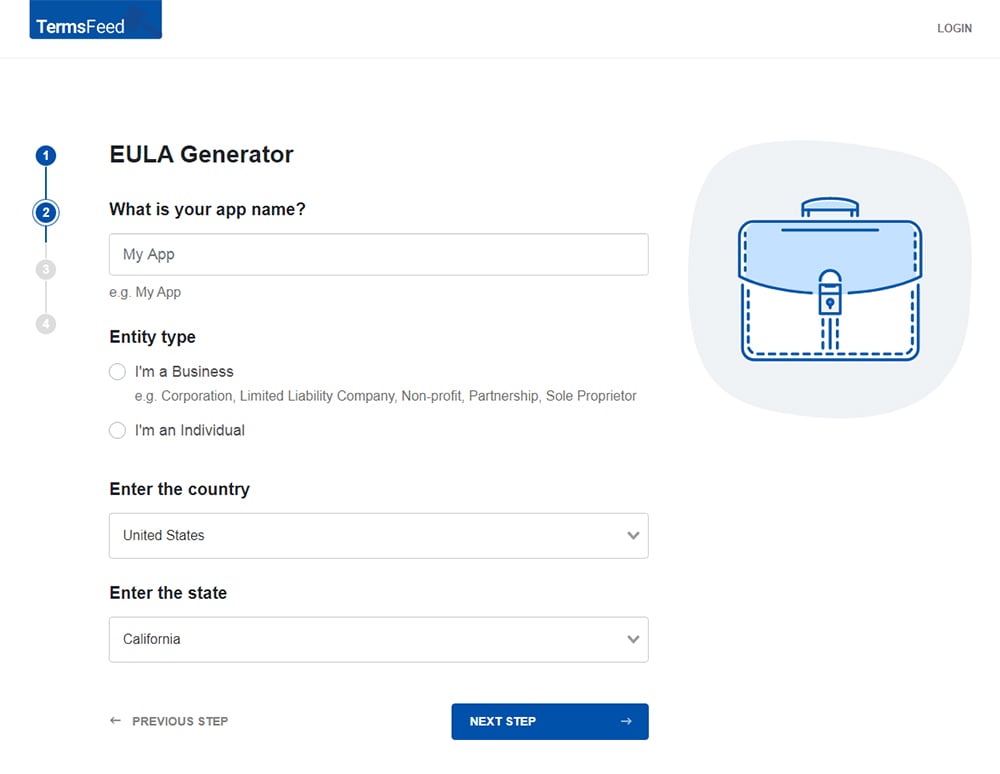
Answer some questions about your app.
-
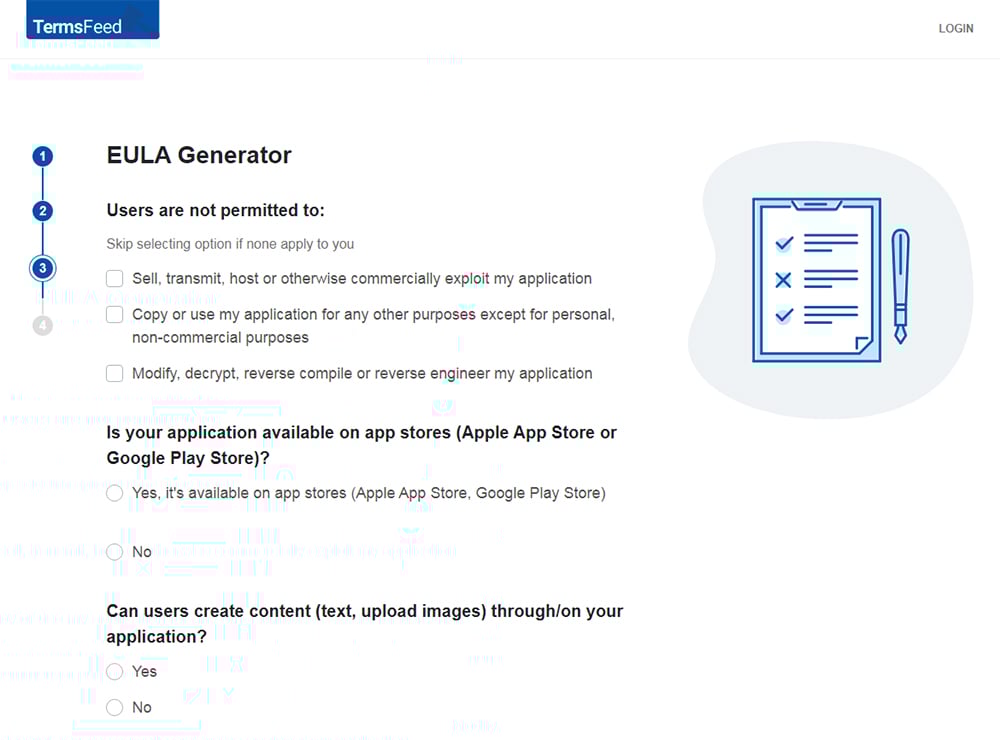
Answer some questions about your business.
-
Enter the email address where you'd like to receive the EULA document and click "Generate."
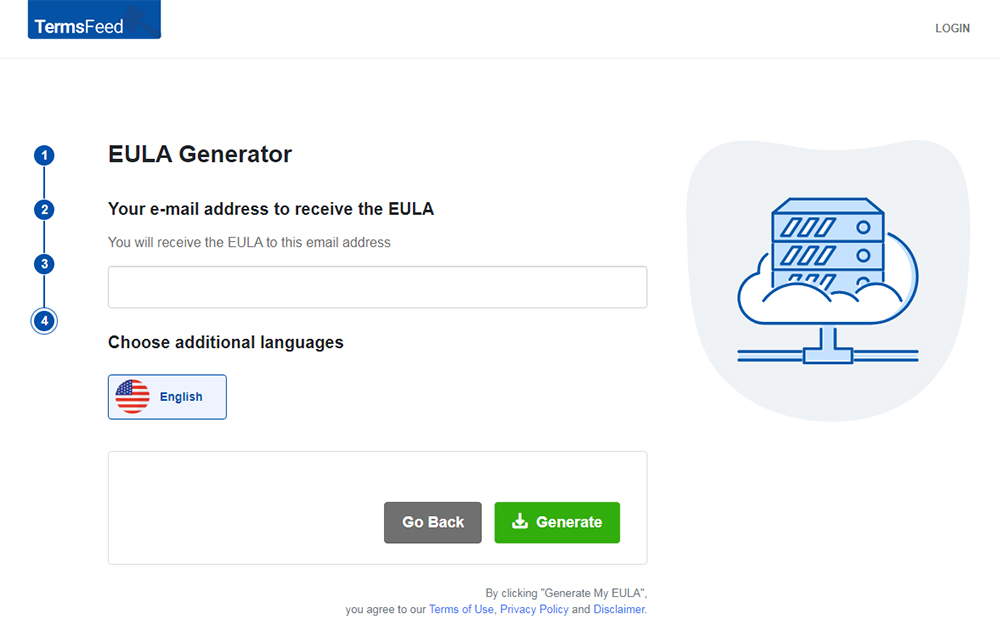
You'll be able to instantly access and download your new EULA.


The EULA relates mainly to the ability of your users to take that copy of your work and use that copy in certain ways, and prohibits things such as reverse engineering and making additional copies.
It may include sections on accountability for behavior that isn't permitted, dispute resolution, and payment details such as membership fees.
Some of the main terms included in an EULA are:
- The terms and scope of the license (i.e. what your users can do with the license, and what they aren't allowed to do, such as make additional copies of it, share it, or modify it)
- Any licensing fees
- Warranties and disclaimers
- Limitation of liability
- Revocation or termination of the license
- Intellectual property information and restrictions on using the license (e.g. modification and copying)
By agreeing to an EULA, a user is granted certain rights over the software. The user also accepts certain responsibilities, and they may also accept legal liability in the event that they cause the developer a loss.
The scope of the license is important to set out clearly what your users are allowed to do and what they can't do.
What are Terms and Conditions?
A Terms and Conditions agreement (sometimes known as "Terms of Service" or "Terms of Use") is an agreement between a service provider and the user of that service.
Our Terms and Conditions Generator makes it easy to create a Terms and Conditions agreement for your business. Just follow these steps:
-
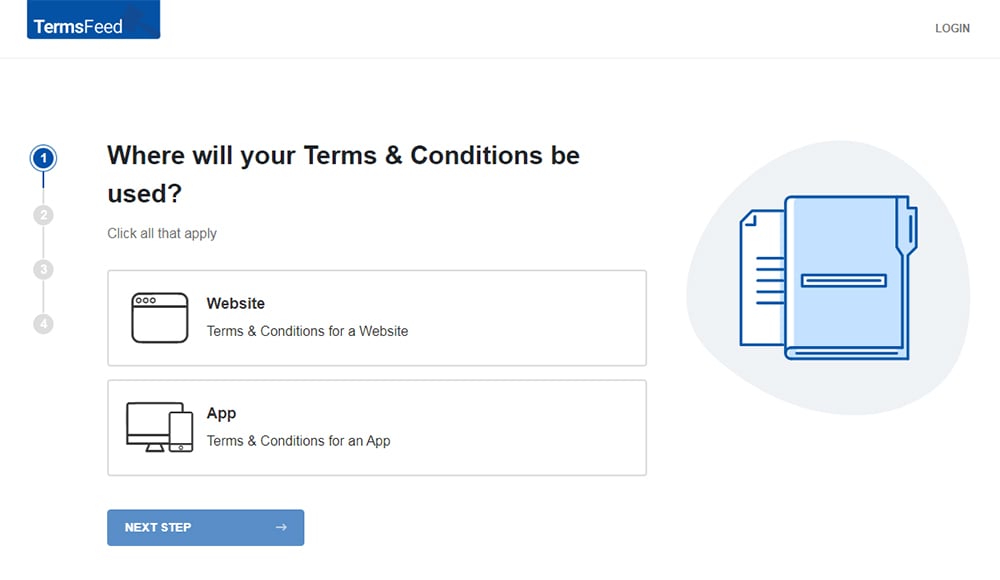
At Step 1, select the Website option or the App option or both.
-
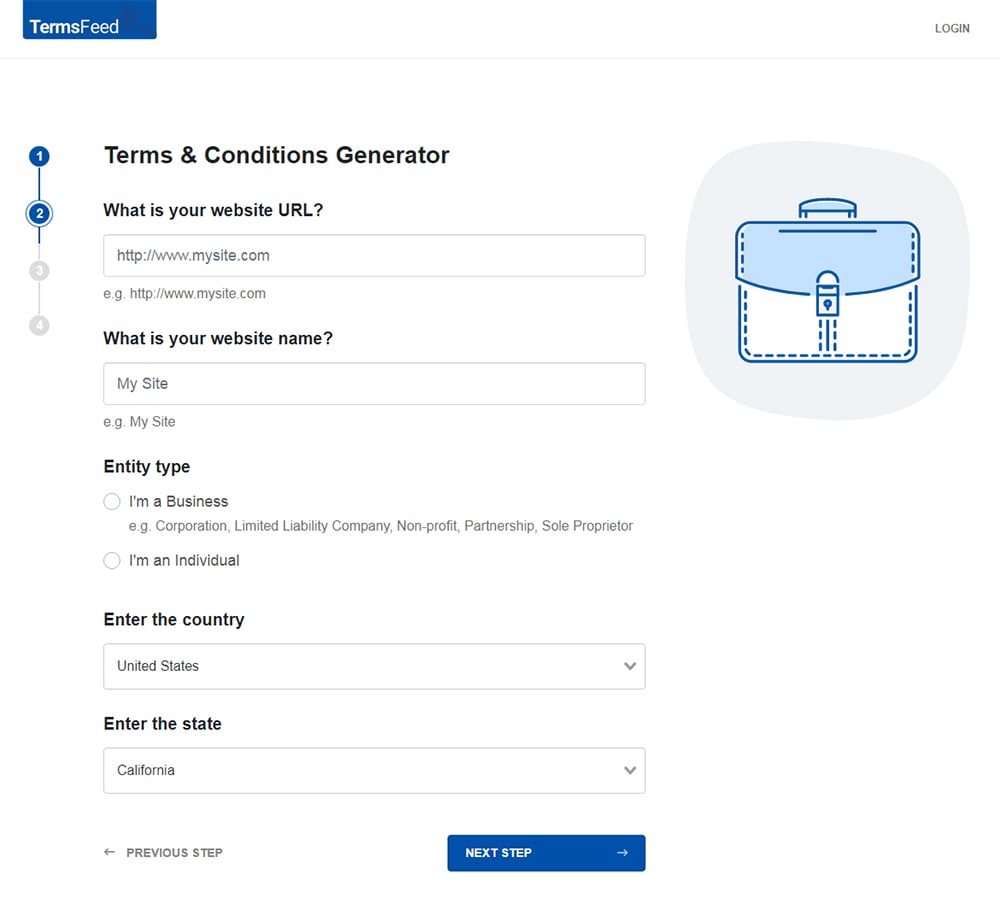
Answer some questions about your website or app.
-
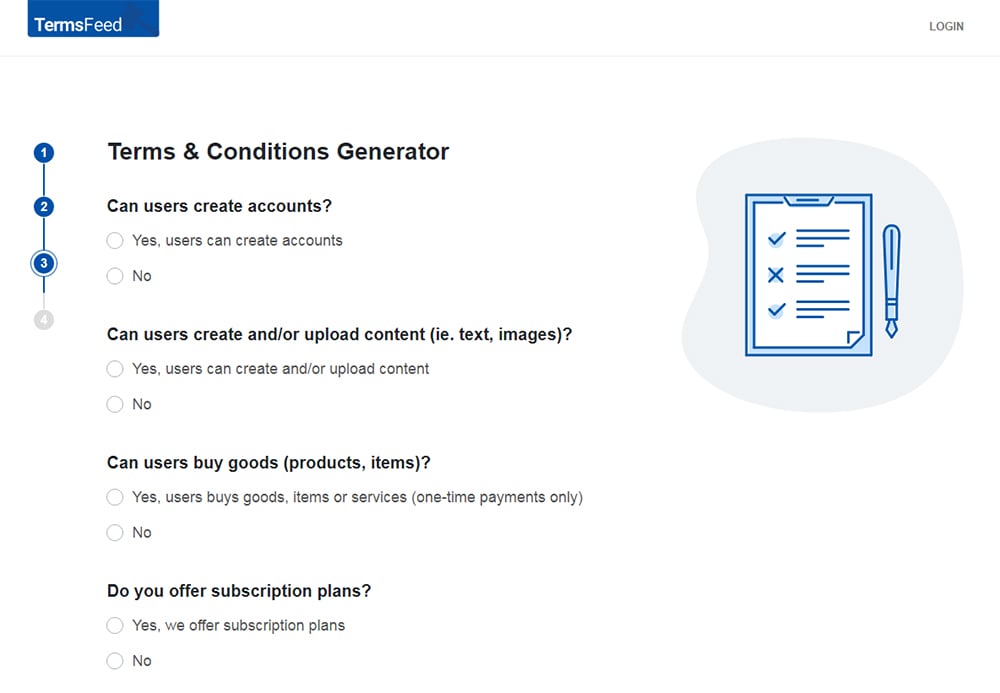
Answer some questions about your business.
-
Enter the email address where you'd like the T&C delivered and click "Generate."
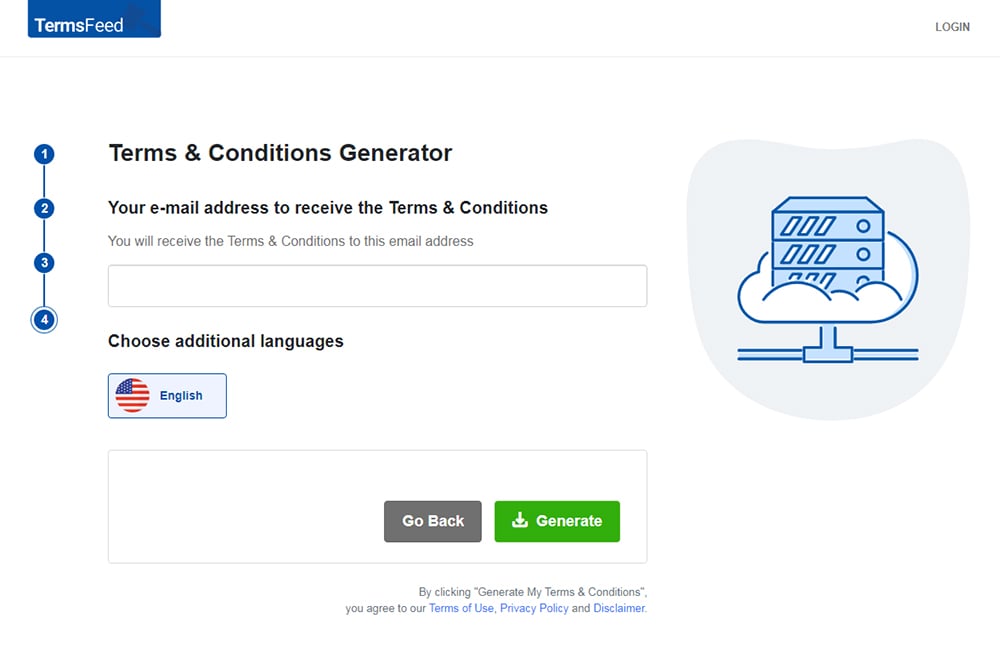
You'll be able to instantly access and download the Terms & Conditions agreement.


While an EULA grants a user the right to use a license, the Terms and Conditions agreement lays out the rules and restrictions for things beyond the license.
Again, upon agreeing to a Terms and Conditions, the user is granted the right to use the service, and they accept certain responsibilities and liabilities for using it.
Terms and Conditions agreements are usually much more broad in scope and would contain clauses such as:
- Jurisdiction and dispute resolution
- Privacy information and link to Privacy Policy
- Changes to terms and modification process, and how notices will be sent
- Rules for using your site or service
- Your right to terminate abusive accounts or accounts at will
It's common to see Limitations of Liability clauses and Warranty Disclaimers in both agreements.
Should I Create an EULA or Terms and Conditions Agreement?
Here's how to decide whether you should be creating an EULA or a Terms and Conditions agreement:
- Use an EULA if you're distributing a piece of software. You own the copyright to the software but you want to grant a license to any user who has bought a copy so that they can install the software on their device.
- Use a Terms and Conditions agreement if you're providing a service, such as Software-as-a-Service (SaaS), a website, or an online store. You provide a service and you want people to use it, but you also want to set some rules about how they use it.
EULA vs Terms and Conditions for Mobile Apps
Aside from the differences in scope and content noted above, a key difference between Terms and Conditions agreements and EULAs in mobile apps is that an EULA is usually set up to pop up when your user first opens your app, while Terms and Conditions are usually somewhere within your app or hosted on a web page elsewhere.
Here's an example of what an EULA could look like when a user opens an app:

Do I Need Both Terms and Conditions and an EULA for my Mobile App?
A Terms and Conditions agreement is more useful if your app has a server-side component, where your app communicates with your server.
Some examples of this are Gmail, 500px, Dropbox etc. where they are essentially just an app that links with your web platform.
A Terms and Conditions agreement is useful here because it can cover all of the aspects in which your user interacts with your service, such as blocking abusive accounts.
If your mobile app is essentially a mobile access point for a SaaS product that you make (such as Dropbox), don't use an EULA but use a Terms and Conditions agreement instead. You don't want to accidentally license your software to your users when they are signing up for the service itself.
An EULA is narrower in scope and only covers the terms of the license of the app software itself, so it is more useful if your app doesn't communicate with a server (i.e. everything stays saved locally on the mobile device).
There are questions about whether EULAs are even legally binding. If you include an "I Accept" button, it is more likely to be enforceable, but courts have criticized lengthy agreements with hidden clauses that users cannot devote the time to reading.
This applies to Terms and Conditions as well. You can fix this problem of enforceability by ensuring that you display your agreements in an easy-to-find place in your app, include an "I Accept" button to prove that your user has agreed to them, and highlight any particularly important clauses in bold or capital letters so that your users can see them.
Apple App Store vs. Google Play
Another factor to consider when you are deciding if you want to include an EULA or Terms and Conditions agreement (or both) is whether or not you want to distribute your app in an app store. App stores oftentimes have requirements that you must comply with, including providing certain legal agreements with your app.
If you don't have your own EULA, Apple imposes a default EULA that binds the user to its terms when they download your app.
Here's the relevant section of Apple's Licensed Application EULA that states that apps available through the App Store are subject to either Apple's "Standard EULA" or the application provider's "Custom EULA" if one is provided:

The default EULA includes things like defining the scope of the license, consent to allow the use of data about the user's device, a limitation of liability, exclusion of liability for third party materials and an exclusion of warranties.
This default EULA from Apple doesn't cover everything you might want to include in your own EULA, so it is usually good to create your own that's tailor-made for your app.
When it comes to Google, the Google Play Developer Distribution Agreement from Google includes at clause 5.3 a requirement that you grant to your users a:
"non-exclusive, worldwide, and perpetual license to perform, display, and use the Product."
It also notes in the same clause:
"If you choose, You may include a separate end user license agreement (EULA) in Your Product that will govern the user's rights to the Product, but, to the extent that the EULA conflicts with this Agreement, this Agreement will supersede the EULA."
So while you can include your own EULA, it can't contain terms that go against the Google Play Developer Distribution Agreement.
The Google Play Terms of Service include some terms between Google and your users that protect you, such as IP protection and disclaimer of warranties. There is no limitation of liability, however, and no privacy-related terms.
This means that if you are developing an Android app, there is a stronger case for including your own EULA and Terms of Use than there is for relying on Google's.
How to Display these Agreements in Your Mobile App
The most important part about displaying your legal agreements is that you make sure your users are able to easily find and access them.
As noted above, most EULAs will pop up when you open an app for the first time. This is commonly how they appear on non-mobile devices as well. When downloading software such as Adobe Acrobat, an EULA will appear when installing the program.
On mobile apps, an EULA usually appears in the same way and is agreed to by using a "clickwrap" method (where you have to click "Accept" or "I Agree" to proceed).
Here's an example that pops up when you first open the SanDisk app on Android:

Other mobile apps also display the EULA by linking to an external website.
Here's an example from a BitTorrent app:

Terms and Conditions agreements don't usually pop up when your user opens the app for the first time, but there's no reason why you can't set it up that way if you want to.
Instead, they are usually placed within a menu (Settings, Legal or About menu) within the app like in this example from YouTube:

Terms of Use are also commonly presented when a user actually signs up for an account with the app as opposed to when the user simply installs the app as seen with an EULA):

Just make sure that your users or potential users are able to access both your EULA and Terms agreement before, during and after downloading and installing your app.
EULA: Frequently Asked Questions
Is an EULA a Legal Requirement?
There's no law requiring software developers to provide an EULA. However, failing to do so can create all sorts of legal problems.
Essentially, creating an EULA ensures you are allowing your user to install a copy of your product, rather than actually selling them the right to own and distribute your product.
What are the Benefits of Creating an EULA?
In addition to the legal benefit described above, an EULA:
- Sets clear expectations on your user
- Establishes the responsibilities of your company
- Can allow you to revoke a user's license if required
Is an EULA a Contract?
Yes, an EULA can be a contract between you and your user.
If it's clear, fair, and has been accepted by your user, an EULA will be enforced by the courts.
Terms and Conditions: Frequently Asked Questions
Are Terms and Conditions a Legal Requirement?
No, there's no legal requirement to create a Terms and Conditions agreement. However, it's an essential document for any business that offers goods or services.
What are the Benefits of Creating Terms and Conditions?
Creating a clear and robust Terms and Conditions agreement brings many benefits:
- It can help you avoid legal trouble and defend your business against legal claims
- It sets clear rules for your users
- It explains what your users can expect from your business
Is a Terms and Conditions Agreement a Contract?
Just like an EULA, a Terms and Conditions agreement can be a legally binding contract.
If it's clear, fair, and has been accepted by your user, a Terms and Conditions agreement will be enforced by the courts.
Clauses Appearing in Both Types of Agreement
First, we'll look at some of the clauses that commonly appear in both EULAs and Terms and Conditions agreements, with examples from both types of agreement.
Other Agreements
If your business has other agreements, such as a Privacy Policy, Terms of Use agreement, or Returns and Refunds Policy, you can make reference to these in your EULA or Terms and Conditions.
In some cases, this section serves to give another agreement precedence over the EULA or Terms and Conditions.
Here's an example from Blackbird's EULA:

The clause means that any special agreement with a corporate licensee will take precedence over Blackbird's EULA if the two agreements contradict one another.
Terms and Conditions agreements often incorporate other agreements, meaning that acceptance of the Terms and Conditions also constitutes acceptance of other agreements.
Here's an example from PayPal:

Disclaimer of Warranties
In most countries, "implied warranties" cover the sale of goods and services.
Think of implied warranties as automatic guarantees as to the quality of your goods or services. Under certain conditions, it may be possible to avoid making these guarantees using your EULA or Terms and Conditions.
There are two main examples of implied warranties in the United States:
- Merchantability: Consumers can normally assume that goods purchased from professional retailers are of average or better quality, correctly labeled, etc.
- Fitness for a particular purpose: Consumers purchasing goods from specialist sellers can expect those goods to be fit for the purpose for which they are sold.
Under the Uniform Commercial Code § 2-316 (available here) you may be able to disclaim these implied warranties if you use specific language (for example, "Goods are sold with all faults"), and make your disclaimers conspicuous (many companies use uppercase letters for this section).
This does not excuse you from providing goods or services of a reasonable quality. But it may give you some leeway in disputes with your customers.
Note that laws on disclaimers vary from place to place, and even between U.S. states. This is why most companies state that they are disclaiming the implied warranties "to the maximum extent permitted by law."
Here's an example of a disclaimer of warranties from Versasec's EULA:

Limitation of Liability
For one reason or another, using your product, service, or even your website might result in a "loss" for the user.
This is why most EULAs and Terms and Conditions agreements contain a "limitation of liability clause." If a user takes you to court, this clause puts a limit on the amount of damages you'll have to pay.
A limitation of liability clause is an alternative to an "exclusion of liability" clause. This type of clause attempts to limit the amount of damages a company will pay to zero. Exclusion of liability clauses are increasingly uncommon as they can be seen by the courts as unfair.
Limitation of liability clauses often use similar wording.
Here's an example from Nest's EULA:

Again, note the phrase "to the maximum extent permitted by applicable law."
Many countries have national laws that set rules about limitation of liability clauses. In the UK, for example, the courts won't recognize limits to liability for injury or death caused by negligence.
Another important point in Nest's limitation of liability clause is the statement that Nest will not be liable for "consequential, exemplary, special, or incidental damages." This means that Nest won't pay for losses that result indirectly from any potential mistake.
Finally, note the sentence stating that "Nest Labs' total cumulative liability [will not] exceed the fees actually paid by you to Nest."
Here's an example of a limitation of liability clause from NFU Mutual's Terms and Conditions:

Note that NFU Mutual's Terms and Conditions govern the use of its website. This clause actually attempts to exclude the company's liability altogether, except for under the limited circumstances listed at the end of the paragraph.
Governing Law
If a dispute occurs between your company and one of your users, it could end up in court. The user won't necessarily live wherever your company is based, so it might not be obvious where the case should be heard.
As the person drafting your EULA or Terms and Conditions agreement, you get to choose the jurisdiction in which such cases will be heard. Generally speaking, it's better to choose the jurisdiction in which your company is based.
Here's an example from HERE's EULA:

And here's an example from the Terms and Conditions of Smoothwall:

Note that Smoothwall states that its Terms and Conditions are "governed by and construed in accordance with law of England." This is because certain principles and terminology are interpreted differently in different places.
EULA Clauses
The following clauses are usually contained in an EULA, but not a Terms and Conditions agreement.
Granting of License
Most EULAs begin with a section that grants the user a license to use the product.
Here's an example from Lasa:

Note that this EULA grants users the right to use, make copies of, and distribute the software. This is more extensive than the "grant of license" clause found in many EULAs, which simply grants users the right to use the software.
Description of Other Rights and Limitations
Along with granting the user a license to use the software, most EULAs also contain a description of the user's other rights and limitations.
Here's an example from Structure Sensor:

This clause sets out some common license limitations, including that:
- The user may not modify or decompile the software
- The user may not install the software in parts across multiple computers
- The user may not transfer the software to another person
Termination of License
An EULA will normally set out the conditions under which the license might be terminated by the business, and sometimes by the user.
Here's an example:

By incorporating these clauses into your EULA, you'll have most of the important areas covered.
Terms and Conditions Clauses
Now we're going to take a look at some clauses that are commonly found in a Terms and Conditions agreement, but that might be less relevant to an EULA.
Acceptance of Terms
In some cases, it's easy to obtain acceptance of your Terms and Conditions, for example if the user has to create an account or place an order in order to use your services.
In other circumstances, such as where a Terms and Conditions agreement covers the use of a website or web app, it might not always be possible to obtain the user's explicit acceptance.
In such circumstances, a Terms and Conditions agreement might contain a clause stating that the user has accepted the agreement by taking a certain action. For example, "using the services," or "browsing the website." This is known as a browsewrap clause.
Here's an example from Fonehouse:

Note that this method of obtaining acceptance is unlikely to be enforced by a court. However, it might be helpful if you ever need to hold one of your users to your Terms and Conditions.
Payments and Billing
If you charge a fee for your services, it's important to set out the terms of payment in your Terms and Conditions.
Here's an example from Secure Fast Hosting:

You can see how this clause might be helpful to Secure Fast Hosting if a dispute arises with a customer. It sets out:
- The date on which customers will be billed
- The length of billing terms
- The conditions of payment
Account Suspension/Termination
Your Terms and Conditions should grant you the right to suspend or terminate your users' accounts. You should also set out the reasons for which you may need to do this.
Here's an example from Solve For Why TV:

Note that these terms specify that a user will still be liable for fees if they have caused the suspension of their account.
Ensuring Your EULA or Terms and Conditions Agreement is Enforceable
Remember that your EULA or Terms and Conditions agreement can be a legally-binding agreement that will be enforced by the courts if it's clear that your users have agreed to it.
This means that you should take all reasonable steps to ensure that you obtain your users' acceptance of your agreement. There are several ways of doing this.
Getting Consent for EULA Agreements
It's relatively easy to obtain acceptance of an EULA.
For physical copies of software products, publishers would typically include a copy of the EULA within the shrinkwrap cover of the box. Opening the shrinkwrap was supposed to constitute acceptance of the EULA.
If you distribute your software product digitally, there's an even easier way to obtain acceptance of your EULA: not "shrinkwrap," but "clickwrap."
A clickwrap agreement asks the user to check a box or click a button in order to accept the terms of the agreement. You can present this option to users when they're installing your app or software product. If they don't accept the EULA, they must not install the software.
Here's an example from Opera:

You should also ensure your EULA is accessible to your users within the software itself.
Here's an example from Opera's mobile app. The EULA is accessible within the "About Opera" page of the app's "Settings" menu:

It's crucial to make sure your users accept your EULA, and it should be relatively straightforward to do so.
Getting Consent for Terms and Conditions Agreements
You should have several opportunities to obtain acceptance of your Terms and Conditions agreement.
For example, you can obtain acceptance of your Terms and Conditions when your user creates an account with your service.
Here's how Asana does this:

You can also ask customers to accept your Terms and Conditions when making a purchase.
Here's an example from H&M:

It's more difficult to obtain acceptance where your Terms and Conditions govern the use of a website, as we've seen in the Acceptance of Terms section above.
Summary
Both an EULA and a Terms and Conditions agreement govern the use of a website, online service or app. If they are fair, clear, and have been accepted by your users, these agreements can constitute legally binding contracts.
- An EULA typically applies to an app or software product that a user installs on their device
- A Terms and Conditions agreement typically applies to a service, website, or SaaS product
Both types of agreement usually contain the following sections:
- A section incorporating or distinguishing other policies and agreements
- A disclaimer of warranties
- A limitation of liabilities
- A section establishing which legal jurisdiction will govern the agreement
An EULA typically contains the following additional sections:
- A granting of a license, with limitations noted
- A description of other rights and limitations
- A section establishing the terms under which the license can be terminated
A Terms and Conditions agreement typically contains the following additional sections:
- Rules for using the site or service, and any prohibited activites or actions
- A section setting the terms of payments and billing, if applicable
- A section establishing the terms under which a user's account can be terminated
You should obtain acceptance of your agreement if you want it to be legally binding.
- For an EULA, you should require the user to accept the agreement before installing the software
- For a Terms and Conditions agreement, you should require the user to accept the agreement before creating an account or placing an order

The first step to compliance: A Privacy Policy.
Stay compliant with our agreements, policies, and consent banners — everything you need, all in one place.


